
An AI ticketing system that shrinks the queue before you open it
Customers open and track tickets without creating accounts. AI deflects the questions your knowledge base already answers, summarizes every thread that remains, and SLA policies keep your team honest on response times.

Every unnecessary ticket costs you twice
A ticket that shouldn't exist costs you once when an agent answers it, and again when the next customer with the same question files another one. Multiply that by every documented-but-still-asked question, and a large share of most queues is pure repetition.
Meanwhile, the tickets that genuinely need attention compete for the same agent hours. Long threads take minutes just to read. Priorities are set by gut feel. Response commitments slip because nobody notices a ticket aging until a customer follows up angrily.
The fix isn't a fancier list — it's a system that prevents unnecessary tickets, compresses the necessary ones, and makes deadlines visible before they're missed.
How GoFastSUPPORT.ai™ ticketing works
The ticketing system starts on the customer side. Before a customer files a ticket, your portal offers instant answers through search and the AI assistant, both grounded in your knowledge base. Many issues end there. When a ticket is warranted — including when the AI recognizes it can't help — submission is frictionless: no account creation, just the details of the problem, with a secure link for tracking status and replying.
On the staff side, every ticket lands in a prioritized queue with an AI-generated summary of the conversation so far. Agents reply with full history and can attach the resolution to your knowledge base workflow so the answer helps future customers automatically.
SLA policies per priority level track response and resolution targets on each ticket, so your team sees exactly what needs attention next and managers see compliance trends over time.
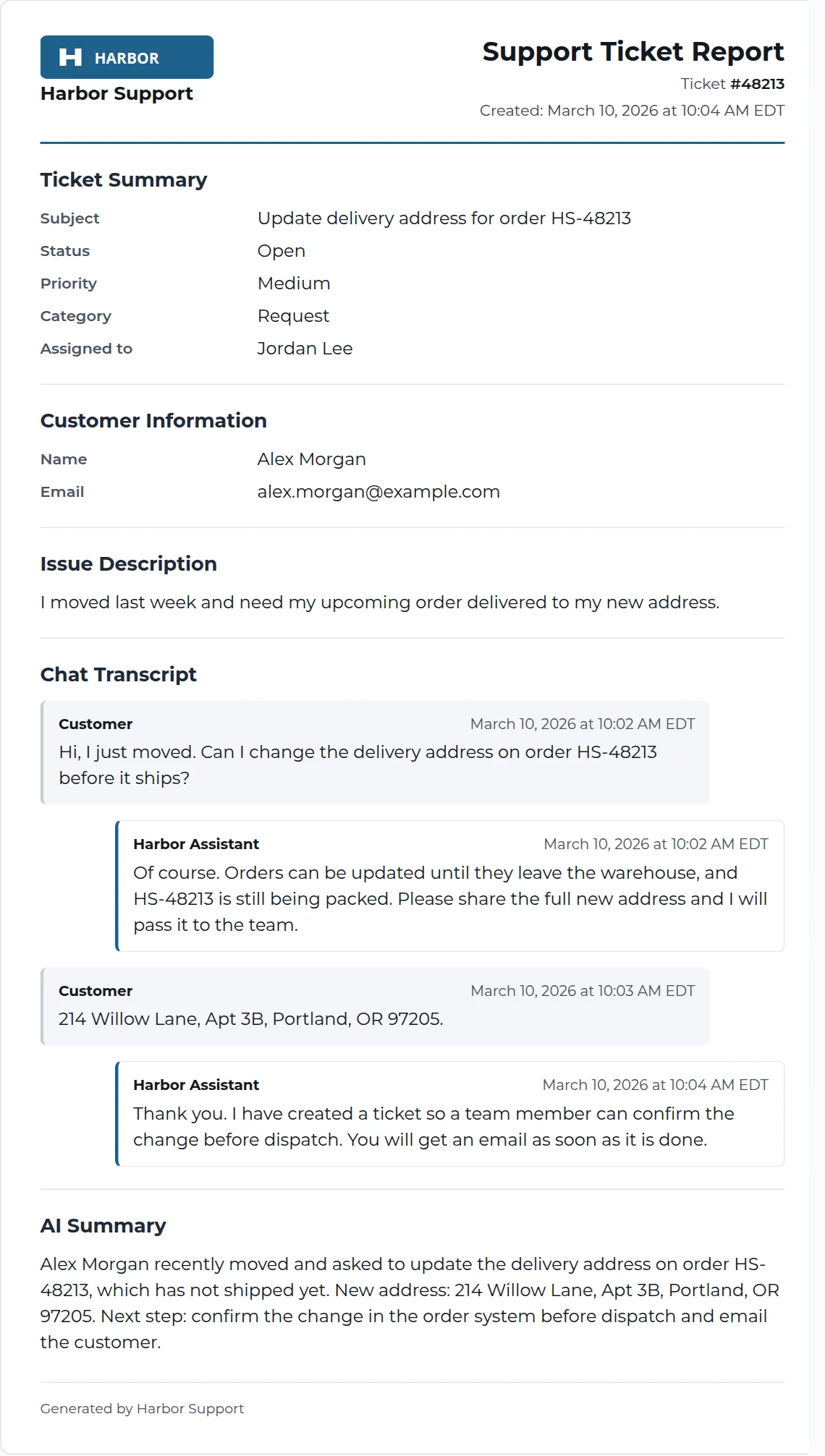
See a complete ticket report
What you get
No-login ticket submission
Customers open tickets in seconds and track them through a secure link — no account creation friction, no lost passwords.
AI deflection before submission
Search and the AI assistant answer documented questions instantly, so tickets are created only when a human is actually needed.
AI thread summaries
Each ticket carries a concise AI summary that updates as the conversation grows, cutting reading time dramatically.
Priorities and SLA policies
Define response and resolution targets per priority; timers on each ticket keep commitments visible to the whole team.
Status tracking for customers
Customers check progress and reply from the portal at any time, reducing the where-is-my-ticket follow-ups that clog queues.
Resolution-to-knowledge loop
Turn resolved tickets into knowledge base drafts (with admin approval via GoFast AutoLearn™) so each answer is only written once.
Why it matters for your business
A materially smaller queue
Deflection removes the repetitive layer, leaving your team a queue that is mostly signal.
Faster resolution times
Summaries, priorities, and SLA timers get the right ticket in front of the right agent with the least overhead.
Fewer status-check interruptions
Self-service tracking means customers answer their own 'any update?' questions.
Accountable response commitments
SLA visibility turns promised response times from aspiration into practice.
Compounding knowledge
Every resolved ticket can strengthen your self-service content, reducing future volume.
From question to resolution
Customer asks
The customer searches your portal or asks the AI assistant — many questions are resolved right here.
Ticket created when needed
If the issue needs a human, a ticket is created — by the customer directly or by the assistant when it recognizes its limits.
AI summarizes and prioritizes
The ticket lands in the queue with a summary and priority, with SLA timers running.
Agent resolves
Your team replies with full context; the customer is notified and can respond from the portal.
Knowledge captured
The resolution can become a knowledge base draft for review, deflecting the same question next time.
Use cases
Product incident intake
Give customers a structured way to report problems with attachments and priority handling instead of scattered emails.
Billing and account inquiries
Route sensitive account questions to humans while the AI handles everything documented.
SLA-backed B2B support
Enforce contractual response times per priority with visible timers and dashboard oversight.
Seasonal volume spikes
Let deflection absorb surges so ticket volume grows slower than customer volume.
Who this is for
- Teams whose current queue is dominated by already-documented questions
- B2B companies with response-time commitments to uphold
- Businesses that want ticket intake without forcing customers to register
- Support leads who want reading time down and resolution rates up
Frequently asked questions
Related features
AI Help Desk Software
A staff dashboard where AI triages and summarizes every conversation, so agents resolve more with less reading.
Customer Support Chatbot
A chatbot that answers only from your approved content, cites its sources, and hands off gracefully to your team.
GoFast AutoLearn™
Every resolved ticket can propose knowledge base improvements — drafted by AI, approved by your administrators.
Live Chat & Staff Takeover
AI handles the routine questions; your staff watch live and take over the moment a customer needs a human — in the same chat window.
Put AI Ticketing System to work in minutes
Every GoFastSUPPORT.ai plan starts with a free 14-day trial. No credit card commitment beyond the trial — cancel anytime.